# Create a Quilt with Different Sized Blocks

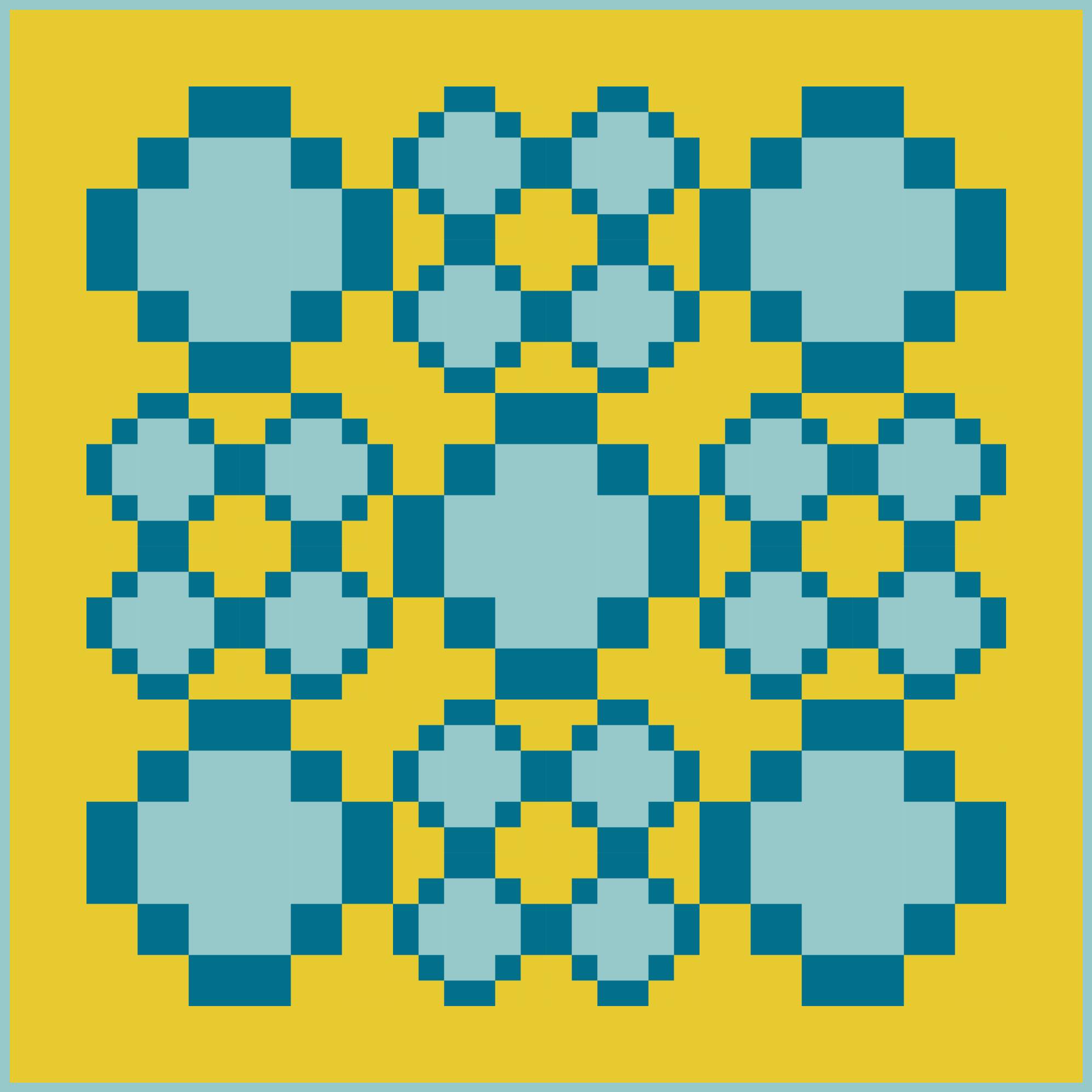
<figure><img src="https://667278489-files.gitbook.io/~/files/v0/b/gitbook-x-prod.appspot.com/o/spaces%2FPUFswdysHBJDPIJC9xe0%2Fuploads%2F8cKmr812PkABh0XKyAwc%2FSep%2024%2C%202025___design.jpg?alt=media&#x26;token=3e9d2bca-0609-42fd-9aa6-9bae457d988b" alt="" width="563"><figcaption><p>Quilt with 8" and 4" quilt blocks</p></figcaption></figure>

## <mark style="color:blue;">Quilts with Different Sized Blocks</mark>

{% hint style="warning" %}
Only the Rectangular Quilt Grid can have different sized quilt blocks.
{% endhint %}

In this tutorial, we'll show you how you can create a quilt that has different sized quilt blocks in it.&#x20;

It's always best to start with a quilt grid made up of smaller blocks that are combined (merged) together to create bigger blocks. You cannot breakdown or divide a larger block into smaller components, but you can always combine smaller blocks to create a bigger block.

***

### <mark style="color:blue;">01 | Determine the Common Block Size</mark>

{% hint style="success" %}
Start by finding the **largest common denominator** for the common quilt block that will fill the quilt grid.
{% endhint %}

The first step is to figure out the size of the quilt's common block size, which will be the beginning block size that can be merged together to create the larger quilt blocks. You want to use the largest common denominator, not the smallest.&#x20;

* **NOTE**: The smallest common denominator is usually 1" square, which can be a headache because the unit is so small and you'll need so many of them to create your overall quilt size. Use this size only when necessary.

So, for example, if you want to create a quilt that has 4" finished squares and 8" finished squares, then the common block size for the quilt grid would be 4" square blocks.&#x20;

* **NOTE**: However, if another example is a quilt with 2" x 4" rectangles, 4" squares, 4" x 8" rectangles, and 8" squares - then your largest common denominator would be 2" square blocks.

Once you know the size of the common quilt block, set the quilt grid to that size.

1. From the QUILT dashboard, click on the <mark style="color:blue;">**Create a Quilt**</mark> button.

   <div align="left"><figure><img src="https://667278489-files.gitbook.io/~/files/v0/b/gitbook-x-prod.appspot.com/o/spaces%2FPUFswdysHBJDPIJC9xe0%2Fuploads%2FAg9jCtJMe7Nn2apWEl6f%2FScreen%20Shot%202023-06-08%20at%2010.47.25%20AM.png?alt=media&#x26;token=80664156-6063-4a4e-8b47-b2889ea5417c" alt=""><figcaption></figcaption></figure></div>
2. For the Rectangular grid, input the dimensions for the common quilt block size. For this example, we're using 4" square blocks.

   * **NOTE**: Remember to input finished quilt block dimensions in inches (not unfinished).

   <figure><img src="https://667278489-files.gitbook.io/~/files/v0/b/gitbook-x-prod.appspot.com/o/spaces%2FPUFswdysHBJDPIJC9xe0%2Fuploads%2F48BpJJWKKjrj8Yw8uo6L%2FScreen%20Shot%202023-06-08%20at%2010.52.11%20AM.png?alt=media&#x26;token=8040c3b8-9e85-4116-94f2-56d1aa04dabb" alt=""><figcaption></figcaption></figure>
3. Click on the <mark style="color:blue;">**Use This Grid**</mark> button to create the quilt.

   <div align="left"><figure><img src="https://667278489-files.gitbook.io/~/files/v0/b/gitbook-x-prod.appspot.com/o/spaces%2FPUFswdysHBJDPIJC9xe0%2Fuploads%2FEjcFHYXApUkESJNOM1yJ%2FScreen%20Shot%202023-06-08%20at%2010.52.01%20AM.png?alt=media&#x26;token=80a952ce-60e8-4cd6-a8a1-967c94e2bd2f" alt=""><figcaption></figcaption></figure></div>

***

### <mark style="color:blue;">02 | Determine the Quilt Size</mark>

Now that we have our common quilt block size determined and set, we will need to determine and set the overall size of the quilt.

In this example, we set our common quilt block size to 4" finished squares. Since PreQuilt's default quilt setting is always 10 columns and 10 rows, our quilt size is 40" x 40".

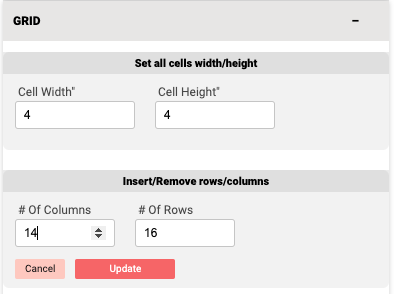
But let's say we want to make a much bigger quilt - 56" x 64". We can do this by adding columns and rows. By doing the math, we know that the number of columns we need is 14 (56 ÷ 4 = 14; 64 ÷ 4 = 16).

1. Click on the <mark style="color:blue;">**GRID tab**</mark> on the left side control panel.

   <div align="left"><figure><img src="https://667278489-files.gitbook.io/~/files/v0/b/gitbook-x-prod.appspot.com/o/spaces%2FPUFswdysHBJDPIJC9xe0%2Fuploads%2FeLRukmmdOckiqz7LIoms%2FScreen%20Shot%202023-06-08%20at%2010.56.45%20AM.png?alt=media&#x26;token=91bbbc94-1270-4f6e-8ccf-a1be1b5ddc72" alt="" width="298"><figcaption></figcaption></figure></div>
2. Input <mark style="color:blue;">**14**</mark> for the # of columns and <mark style="color:blue;">**16**</mark> for the number of rows.

   <div align="left"><figure><img src="https://667278489-files.gitbook.io/~/files/v0/b/gitbook-x-prod.appspot.com/o/spaces%2FPUFswdysHBJDPIJC9xe0%2Fuploads%2FONH256t8q2MPmrpnA3gh%2FScreen%20Shot%202023-06-08%20at%2010.57.59%20AM.png?alt=media&#x26;token=2a8db915-187c-4041-8a62-389e70661c41" alt="" width="296"><figcaption></figcaption></figure></div>
3. Click on the <mark style="color:blue;">**Update**</mark> button to save.

   <div align="left"><figure><img src="https://667278489-files.gitbook.io/~/files/v0/b/gitbook-x-prod.appspot.com/o/spaces%2FPUFswdysHBJDPIJC9xe0%2Fuploads%2FwGCfM3ucFXsbEWmCLR80%2FScreen%20Shot%202023-06-08%20at%2010.58.08%20AM.png?alt=media&#x26;token=dc2c3209-fb4d-4061-9866-84bcfb389155" alt=""><figcaption></figcaption></figure></div>
4. We can now see that the overall quilt grid is set to 56" x 64" using 4" blocks.

   <div align="left"><figure><img src="https://667278489-files.gitbook.io/~/files/v0/b/gitbook-x-prod.appspot.com/o/spaces%2FPUFswdysHBJDPIJC9xe0%2Fuploads%2FQjCjCTnROru5HGfXHytu%2FScreen%20Shot%202023-06-08%20at%2011.02.54%20AM.png?alt=media&#x26;token=3e4dd9a5-0e5b-4ef8-a431-30cc2f0895dd" alt="" width="362"><figcaption></figcaption></figure></div>

***

### <mark style="color:blue;">03a | Merge Cells to Create Larger Quilt Blocks</mark>

Now that we've determined what our largest common denominator for the quilt block is (4" squares) and we've determined the overall size of our quilt (56" x 64"), we can now start merging blocks together to create our quilt layout.

In this example, we want to have both 4" and 8" finished square blocks. A 4" quilt block is the foundation common quilt block, so we don't need to do anything to create it. To create an 8" quilt block, we will need to combine 4 individual 4" blocks together.

1. On the quilt grid (or digital design wall), click on the <mark style="color:blue;">**quilt cell blocks**</mark> that you want to merge (or combine) together to create an 8" quilt block.

   1. **NOTE**: To select a cell block, click on it. Once selected, the cell block will be outlined in blue.

   <div align="left"><figure><img src="https://667278489-files.gitbook.io/~/files/v0/b/gitbook-x-prod.appspot.com/o/spaces%2FPUFswdysHBJDPIJC9xe0%2Fuploads%2FC0iTZjUE07nRBPkXjGo3%2FScreen%20Shot%202023-06-08%20at%2011.09.30%20AM.png?alt=media&#x26;token=a68310ac-66d8-4e6b-ac8a-aceb1f154d77" alt=""><figcaption></figcaption></figure></div>
2. With the 4 cell blocks selected, click on the <mark style="color:blue;">**Merge**</mark> button (<img src="https://667278489-files.gitbook.io/~/files/v0/b/gitbook-x-prod.appspot.com/o/spaces%2FPUFswdysHBJDPIJC9xe0%2Fuploads%2FZEAohAudG2xtWCKWRBDx%2FScreen%20Shot%202023-06-08%20at%2011.11.30%20AM.png?alt=media&#x26;token=085c251f-6298-44f7-9fdb-9091f16f9591" alt="" data-size="line">) on the central, vertical toolbar.

   <div align="left"><figure><img src="https://667278489-files.gitbook.io/~/files/v0/b/gitbook-x-prod.appspot.com/o/spaces%2FPUFswdysHBJDPIJC9xe0%2Fuploads%2FoS97ss8XF0Ytdcyh8Fzq%2FScreen%20Shot%202023-06-08%20at%2011.11.42%20AM.png?alt=media&#x26;token=4a871c59-5bf5-4385-ab5c-4b8329d0abcf" alt=""><figcaption></figcaption></figure></div>
3. Once merged, the 4 individual cell blocks will be merged into 1 larger cell block.

   <div align="left"><figure><img src="https://667278489-files.gitbook.io/~/files/v0/b/gitbook-x-prod.appspot.com/o/spaces%2FPUFswdysHBJDPIJC9xe0%2Fuploads%2FstJBYPWNGtoIlphP52wK%2FScreen%20Shot%202023-06-08%20at%2011.14.35%20AM.png?alt=media&#x26;token=0ca68bba-9ce7-465c-839d-19debafcd226" alt=""><figcaption></figcaption></figure></div>
4. Continue merging smaller common blocks into larger blocks until you have your desired quilt layout.&#x20;

   <div align="left"><figure><img src="https://667278489-files.gitbook.io/~/files/v0/b/gitbook-x-prod.appspot.com/o/spaces%2FPUFswdysHBJDPIJC9xe0%2Fuploads%2FLqbZjxjs29G38Dz6BqQv%2FScreen%20Shot%202023-06-08%20at%2011.18.54%20AM.png?alt=media&#x26;token=ec2317d2-3f74-4c0b-8478-19d60917439d" alt="" width="360"><figcaption></figcaption></figure></div>

***

### <mark style="color:blue;">03b | How to Unmerge Cell Blocks</mark>

If you want to undo a merged block, that's not a problem!

1. Click on the <mark style="color:blue;">**quilt**</mark> <mark style="color:blue;">**cell block**</mark> you want to unmerge back into the smaller common blocks.

   <div align="left"><figure><img src="https://667278489-files.gitbook.io/~/files/v0/b/gitbook-x-prod.appspot.com/o/spaces%2FPUFswdysHBJDPIJC9xe0%2Fuploads%2FMLQTkZ7Co42eBirvIwva%2FScreen%20Shot%202023-06-08%20at%2011.18.10%20AM.png?alt=media&#x26;token=525f50ba-f976-4193-9d04-615617876564" alt=""><figcaption></figcaption></figure></div>
2. Click on the <mark style="color:blue;">**Merge/Unmerge**</mark> button (<img src="https://667278489-files.gitbook.io/~/files/v0/b/gitbook-x-prod.appspot.com/o/spaces%2FPUFswdysHBJDPIJC9xe0%2Fuploads%2FBSgmpqCW72xeDnzOm91y%2FScreen%20Shot%202023-06-08%20at%2011.18.21%20AM.png?alt=media&#x26;token=4c20ad61-ea40-417a-80f7-5f9c476160a3" alt="" data-size="line">) on the central, vertical toolbar.

   <div align="left"><figure><img src="https://667278489-files.gitbook.io/~/files/v0/b/gitbook-x-prod.appspot.com/o/spaces%2FPUFswdysHBJDPIJC9xe0%2Fuploads%2FhCNzoMu0LPv9sHlc9icy%2FScreen%20Shot%202023-06-08%20at%2011.18.32%20AM.png?alt=media&#x26;token=0dcce865-4c69-4178-be73-653dad9839a2" alt=""><figcaption></figcaption></figure></div>
3. Now the larger block has been divided back into 4 individual cell blocks.
   <div align="left"><figure><img src="https://667278489-files.gitbook.io/~/files/v0/b/gitbook-x-prod.appspot.com/o/spaces%2FPUFswdysHBJDPIJC9xe0%2Fuploads%2FSAOvcZFVCZmBkUYKaz5u%2FScreen%20Shot%202023-06-08%20at%2011.23.50%20AM.png?alt=media&#x26;token=f9bf5f80-ce9c-4043-9968-1ad78d0ca94f" alt=""><figcaption></figcaption></figure></div>